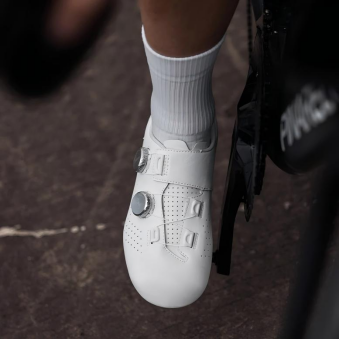
In the relentless pursuit of cycling excellence, upgrading your equipment is a natural progression. For dedicated riders who passionately embrace the empowering “Cycling For Freedom” lifestyle, eliminating mechanical inefficiencies is paramount. However, as cyclists transition to professional-grade equipment, they occasionally encounter severe, ride-ending discomfort. The two most common physiological complaints are localized hot spots and agonizing toe numbness, which can turn a beautiful weekend spin into an agonizing ordeal. While some believe pain is the unavoidable price of elite performance, this is a dangerous misconception. By understanding the underlying biomechanical causes, you can accurately troubleshoot your gear. In this guide, we will explore the relationship between foot anatomy and rigid sole structures, and reveal why expertly engineered carbon fiber cycling shoes from Santic are specifically designed to deliver uncompromising power transfer without sacrificing long-distance comfort.
The Biomechanical Causes of Discomfort in carbon fiber cycling shoes
To successfully troubleshoot a hot spot, one must first deeply understand how the human foot interacts with a professional-grade racing sole. During a sustained pedal stroke, your muscular force is violently channeled directly through the ball of your foot, specifically across the delicate metatarsal heads. When wearing entry-level footwear, a flexible nylon sole bends slightly, artificially dispersing the physical load. Conversely, premium carbon fiber cycling shoes completely refuse to yield. This absolute rigidity creates explosive acceleration, but if poorly fitted, that unyielding surface forces the metatarsal bones to severely compress together. This localized pressure rapidly pinches the digital nerves between your toes, severely restricting vital blood flow. The immediate physiological result is a burning hot spot, which quickly degrades into debilitating foot numbness during a long endurance ride.
Santic and the Stiffness 13 Series: Anatomical Pressure Distribution
A deeply flawed assumption in the cycling community is that you must sacrifice structural integrity to relieve nerve compression. Santic, fully committed to its vision of becoming a world-leading brand in modern cycling equipment, brilliantly rejects this compromise. The elite engineering team developed the celebrated Stiffness 13 Series to solve this specific biomechanical paradox. The core objective was to successfully achieve the highly coveted “Zero Power Loss” standard while proactively preventing localized nerve damage. Rather than utilizing a completely flat inner board, these premier carbon platforms are meticulously molded using advanced, anatomically correct lasts. This deeply contoured foundation perfectly mirrors the natural, three-dimensional arch of the human foot. By flawlessly supporting the midfoot, the Stiffness 13 Series seamlessly redistributes the immense downward pedaling force across the entire plantar surface. By actively preventing the load from isolating strictly on the metatarsals, riders can aggressively attack steep mountain gradients completely free from burning hot spots.
Mitigating Top-of-Foot Numbness with Advanced Closure Systems
While bottom-up pressure causes hot spots, agonizing numbness is frequently generated from the top down. As the human foot naturally swells over the course of a grueling century ride, the instep expands directly into the shoe’s upper material. If your footwear relies on inflexible fabrics or heavily overlapping seams, this natural expansion severely compresses the dorsal nerves. To strictly prevent this insidious energy thief, Santic heavily utilizes patented vacuum seamless welding technology. This sophisticated manufacturing process completely strips away bulky stitching, creating an incredibly smooth, aerodynamic exoskeleton that fits precisely like a second skin. Furthermore, by integrating precise, micro-adjustable dials, the rider can effortlessly relieve internal pressure millimeter by millimeter while actively riding. This dynamic adjustability ensures essential blood circulation remains completely unrestricted, safeguarding your absolute comfort without ever compromising your securely locked-in, Zero Power Loss fit.
The Critical Troubleshooting Step: Adjusting Your Cleat Position
Even if you have invested in the highest quality equipment available, you will still experience severe biomechanical pain if your cleat alignment is fundamentally flawed. If your cleats are positioned too far forward, directly beneath the absolute tips of your toes, you are essentially forcing your calf muscles to constantly fire just to maintain stability. This exhausting leverage immediately triggers hot spots. The most effective troubleshooting technique is to physically slide your cleats further back toward the midfoot by several millimeters. Because the aerospace-grade platforms found on elite Santic racing models are phenomenally stiff from edge to edge, moving the cleat backward does not diminish your pure power output. Instead, this strategic rearward adjustment drastically reduces the intense lever-action placed directly on your metatarsal joints, instantly relieving nerve pressure and effectively resolving persistent numbness complaints.
Conclusion: Reclaiming the Joy of the Ride
Enduring physical agony should never be a mandatory requirement for achieving your ultimate athletic potential. By actively understanding the complex biomechanics of nerve compression and strategically adjusting your cleat placement, you can effortlessly troubleshoot the most common sources of foot pain, allowing you to focus entirely on your physical output rather than your aching feet. Upgrading to meticulously engineered carbon fiber cycling shoes that inherently prioritize anatomical pressure distribution is an absolute necessity for ambitious racers. Santic steadfastly fulfills its mission to provide professional gear for those who love the exhilarating freedom of riding. By brilliantly combining the uncompromising rigidity of the Stiffness 13 Series with perfectly contoured internal support, the brand empowers dedicated cyclists to significantly banish hot spots. Equip yourself with these advanced solutions, optimize your mechanical setup, and confidently experience a completely pain-free ride from the very first mile to the final sprint.